Updating the Prime Contact can be necessary when a contact accidentally creates a child as the prime contact. This function is reserved for admins.
Log into the Back Office.
- Click “Manage a Household”
- Search for a household.
- The household loads.
- In the go-to menu, select Household Contacts
- The contacts display. The column “prime contact” will have a checkbox (grid) or true (list view).
- To change this, click the “edit” button to view the contact detail modal.
- Uncheck prime contact.
- Save.
- IMPORTANT: Each household must have a prime contact.
- Click edit button next to the desired prime contact.
- A modal opens.
- Check the box indicating Prime Contact.
- Save.
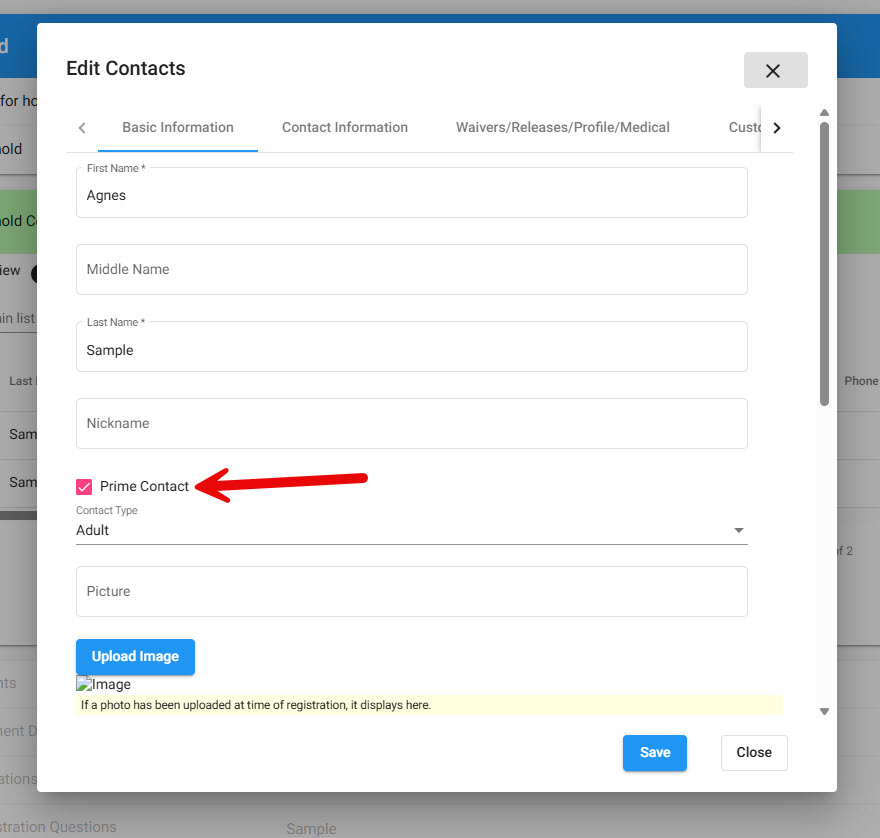
Often a youth has been accidentally entered as Prime Contact. This same area allows admins to change youth to adult.